A broken golf bag stand leg can be fixed at home using common tools for issues like loose bolts, dirt buildup, or bent legs. Many stand bag problems, such as a wobbly leg or a complete breakdown, are surprisingly simple to repair yourself, saving the expense of a new bag. This guide provides step-by-step instructions to diagnose and resolve the most frequent stand leg issues, ensuring your golf bag remains stable on the course.
Understanding Your Golf Bag Stand Mechanism
Most stand bags utilize a straightforward mechanical system for leg deployment, consisting of three main parts: the actuator, the pivot mechanism, and the legs with their tension system. The actuator, a plastic foot at the bag’s base, initiates leg deployment when pressed against the ground. This foot connects to an internal rod or cable that runs up to the pivot mechanism.
The pivot mechanism, typically near the top cuff, is where both legs attach. When the actuator pulls the internal linkage, it forces the legs outward for standing. Legs are secured at the pivot by bolts or screws, and a tension system, like a limiter cord, ensures proper retraction and prevents excessive splaying. For golf bag buying guides on this site.
Why Do Golf Bag Stand Legs Break?
Golf bag stand legs break due to relentless wear and tear, with dirt and debris being a frequent culprit. Mud, sand, and grass clippings can accumulate in the pivot mechanism and around the actuator, causing jamming or sluggish operation. Loose hardware, such as primary bolts and screws, can lead to wobbly legs that fail to retract properly over time.
Mechanical stress and plastic fatigue also contribute significantly. Stand legs, especially aluminum ones, can bend or snap from impacts like being caught in a golf cart or slammed in a car trunk. Additionally, a stretched or broken limiter cord will cause legs to splay excessively, making the bag unstable or prone to collapse.
Diagnosing the Damage: Is it Repairable?
Before attempting repairs, thoroughly assess the damage by emptying your golf bag for easier maneuverability and better visibility. Place the bag on the floor and manually press the actuator foot, observing the legs closely:
- No Movement: Indicates a snapped or detached internal linkage system.
- One Leg Deploys, Other Doesn’t: Suggests an issue at the stuck leg’s pivot point, such as a loose bolt or hinge obstruction.
- Weak Deployment/Poor Retraction: Often signals dirt buildup, friction, or a loose main bolt.
- Legs Splay Too Far: Typically points to a stretched or broken limiter cord.
- Bent or Snapped Leg: Requires visual inspection for bends, cracks, or complete breaks, particularly at connection points.
Minor issues like dirt buildup or loose bolts are highly probable DIY fixes. Bent legs can often be carefully straightened. However, if a critical plastic component of the pivot mechanism is completely shattered, a home repair might not be durable. In severe cases, contacting the manufacturer for replacement parts or considering a new bag may be more practical.
Essential Tools and Materials for DIY Repair
Most common golf bag stand repairs can be done with basic tools. Set up a clean, well-lit workspace to prevent losing small parts.
Here’s a checklist of what you might need:
- Screwdrivers: Phillips and flathead for various bolt types.
- Wrench Set or Adjustable Wrench: For tightening nuts and bolts at the pivot mechanism.
- Stiff Brush (e.g., old toothbrush): For scrubbing dirt and grime from pivot points.
- Warm, Soapy Water: For effective cleaning.
- Silicone-Based Lubricant Spray or Dry Graphite Lubricant: For smooth operation; avoid oily lubricants like WD-40.
- Nylon Paracord or Sturdy Shoelace: For replacing a broken limiter cord.
- Strong Epoxy (e.g., club head epoxy): For reattaching or reinforcing broken plastic parts.
- Mallet and/or Pick Tool: For removing or inserting pin screws.
- Old Graphite Shaft or Wooden Dowel: A potential material for replacing a fully broken leg.
- Fiberglass Repair Tape or Small Metal Mesh: For reinforcing epoxy repairs.
- Masking Tape: To adjust the fit of replacement feet on smaller diameter legs.
Having these items ready ensures efficient and effective repair of most common stand leg issues.
Step-by-Step Guide to Fixing a Broken Stand Leg
Addressing a broken stand leg requires a systematic approach, depending on the nature of the damage. Here’s how to tackle the most common issues:
Fixing Slow, Sticky, or Grinding Legs
|
Our Picks for the Best Golf Bag in 2026
As an Amazon Associate I earn from qualifying purchases.
|
||
| Num | Product | Action |
|---|---|---|
| 1 | OGIO RIG 9800 Wheeled Suitcase (Stealth) |

|
| 2 | Findway 14 Way Golf Stand Bag, Lightweight Golf Bag with Stand for Men Women, Golf Club Carry Bag with Dual Strap, Rain Cover, Multiple Pockets, Golf Ball Holder |
|
| 3 | Sun Mountain Men's C130 Lightweight Cart Golf Bag 14-Way Top - 2025 Model |
|
| 4 | TaylorMade Pro Stand Bag, Lightweight, Ideal for Carrying or Push Cart |
|
| 5 | Cart Golf Bag 15 Way Organizer Divider Top Golf Club Bags Lightweight Golf Cart Bags for Men Women with Cooler, Rain Cover |
|
| 6 | Titleist Players 4 Golf Bag |
|
| 7 | Himal Outdoors Golf Travel Bag - Heavy Duty 600D Polyester Oxford Wear-Resistant, Excellent Zipper Universal Size with Wheels, Soft-Sided Golf Club Travel Cover to Protect Clubs |
|
| 8 | Golf Stand Bag - Lightweight Golf Bag with Stand and 7 Way Dividers, Dual Strap, Waterproof Pocket, Insulated Sleeve, Easy-Lift Handles and Swing-Cam Holder |
|
| 9 | TaylorMade Pro Stand Bag, Lightweight, Ideal for Carrying or Push Cart |
|
| 10 | KVV Lightweight Golf Stand Bag with 7 Way Full-Length Dividers, 5 Zippered Pockets, Automatically Adjustable Dual Straps,Elegant Design |
|
This common issue usually indicates accumulated dirt and debris.
- Initial Wipedown: Use a dry rag to wipe down the legs and the entire pivot area at the top of the bag, removing any loose dirt or grass.
- Scrub the Grime: Dip a stiff brush (an old toothbrush works well) into warm, soapy water and thoroughly scrub the pivot mechanism. Pay close attention to all the crevices where the legs attach and rotate.
- Rinse and Dry: Rinse the area with clean water and allow it to dry completely.
- Lubricate: Once dry, apply a light coat of silicone-based lubricant spray or a dry graphite lubricant to all moving parts in the pivot hub. Manually extend and retract the legs several times to work the lubricant into the joints.
Repairing Loose, Floppy, or Wobbly Legs
If your legs feel loose and don’t tuck neatly against the bag, a loose main bolt is the likely culprit.
- Locate the Pivot Bolt: Find the central bolt or screw at the pivot mechanism where the two legs connect to the bag. This bolt acts as the axle for the entire assembly.
- Choose Your Tool: Identify if it’s a Phillips screw, flathead, or hex bolt and select the corresponding screwdriver or wrench. You might need a wrench to hold a nut on one side while tightening the bolt from the other.
- Tighten Carefully: Gently tighten the bolt, checking the leg tension every half-turn. The goal is snug, not overly tight, to ensure smooth movement without wobbling.
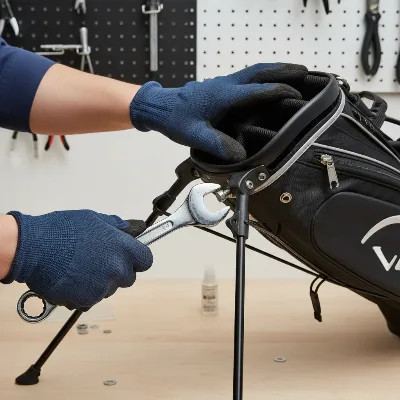 Golfer tightening a loose pivot bolt on a golf bag stand leg mechanism with a wrench on a workbench.
Fixing Bent Aluminum Legs
If a leg has been bent, patience is key to straightening it without causing further damage.
- Remove the Leg (If Possible): If your bag allows, remove the bent leg by taking out any pins or clips at the pivot point. This makes it easier to work on.
- Flat Surface: Lay the bent section of the leg on a sturdy, flat surface like a workbench.
- Gentle Pressure: Apply gentle, steady pressure with your hands along the bend, slowly working to ease it back into a straight line. Avoid forceful pushes, which can create kinks or snap the leg.
- Leverage with Tubing: For more stubborn bends, slide a small section of PVC or brass tubing over the bent end. This provides extra leverage and helps distribute the load, preventing new kinks.
- Reattach: If you removed the leg, reattach it by reversing the removal steps.
“A common mistake with bent legs is trying to force it straight in one go. Slow and steady pressure, working along the bend, is much more effective and prevents further damage.” – Mark G., Experienced Golf Equipment Repair Specialist
Repairing a Broken Limiter Cord
A broken or stretched limiter cord causes the legs to splay too wide.
- Locate the Cord: Extend the legs and find the thin fabric or nylon cord running between the mid-points of the two legs.
- Assess Damage: Determine if the cord is merely detached (in which case you might simply re-tie it), or if it’s completely broken or stretched.
- Fashion a Replacement: If replacement is needed, use a strong nylon paracord or even a sturdy shoelace. Tie one end securely to one leg. Set the bag up to your desired leg spread, mark the cord where it reaches the other leg, and tie it securely there. Trim any excess.
Replacing a Fully Broken Leg
If a leg is snapped or irreparably damaged, replacement is your best bet.
- Manufacturer Parts: First, check with your bag’s manufacturer. Brands like Ping, Sun Mountain, Titleist, and Callaway are known for customer service and may offer replacement parts, sometimes even under warranty.
- DIY Replacement Leg: If official parts aren’t available, you can create a new leg. An old graphite shaft from a broken club, cut to the correct length, works exceptionally well. Some golfers have successfully used wooden dowels of appropriate diameter.
- Remove Old Leg: Typically, legs are secured by pin screws or rivets at the pivot point. You might need a Phillips screwdriver and a mallet to tap out these pins. For rivets, a cobalt drill bit may be necessary to drill them out.
- Insert New Leg: Carefully insert your new replacement leg. Ensure it’s correctly oriented (some bags have left/right specific legs).
- Secure: Hand-press new pin screws into place, then use a mallet to hammer them fully in. If you drilled out rivets, Chicago screws (two-piece threaded fasteners) can be an excellent replacement for pivot points, as they allow for pivoting action.
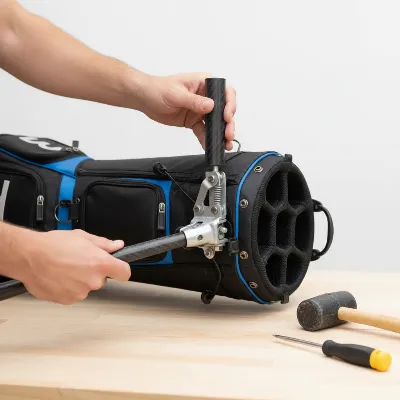 A person replacing a broken stand leg on a golf bag with a new carbon fiber leg, tools on a table.
Preventative Measures to Protect Your Stand Legs
Once your golf bag’s stand legs are functioning perfectly, maintaining them is key to preventing future breakdowns. Simple habits can significantly extend the life of your bag and its crucial standing mechanism.
Regular cleaning is paramount. Make it a routine to wipe down the legs and the pivot area after each round, especially if you’ve played in muddy or sandy conditions. This prevents dirt and debris from caking up the mechanism, which is a leading cause of sluggish or jammed legs. Periodically, a deeper clean with soapy water and a brush, followed by a silicone-based lubricant, will keep everything moving smoothly.
Routinely check all screws and bolts at the pivot points for looseness. A quick tighten with the appropriate tool can prevent wobbly legs and more severe damage down the line. Consider investing in a leg tether strap if your bag doesn’t have one and you notice the legs splaying out or failing to retract fully when you lift the bag. These straps attach to the legs and the carry strap, pulling the legs flush against the bag as you pick it up. Lastly, when transporting your bag, be mindful of how it’s placed in a golf cart or car trunk. Avoiding situations where the legs can get bent or stressed will go a long way in ensuring its longevity. If durability is a major concern, some manufacturers offer or allow upgrades to more robust materials like carbon fiber for the stand legs.
Conclusion
A broken stand leg on your golf bag doesn’t have to signal the end for your trusted companion. With a little diagnosis, the right tools, and a hands-on approach, many common issues—from sticky pivots to entirely broken legs—can be resolved quickly and effectively. Whether it’s a simple cleaning and lubrication, tightening a loose bolt, or performing a more involved leg replacement, these DIY fixes can save you money and keep your bag standing tall for many more rounds. So, which repair will you tackle first to get your golf bag back in prime condition?
Frequently Asked Questions
Frequently Asked Questions
Can all types of golf bag stand leg breaks be fixed at home?
Many common issues like loose bolts, dirt buildup, or bent legs can be fixed at home with basic tools. However, severe damage, such as a completely shattered plastic pivot mechanism, might require contacting the manufacturer for specialized replacement parts or professional repair.
What kind of lubricant should I use for my golf bag stand mechanism?
It is best to use a silicone-based lubricant spray or a dry graphite lubricant for your golf bag stand mechanism. Avoid oily lubricants like WD-40, as they tend to attract and accumulate more dirt and grime over time, leading to recurring issues.
Is it possible to replace a golf bag stand leg with a non-original part?
Yes, if original replacement parts are unavailable, you can often fashion a replacement leg using materials like an old graphite golf shaft or a sturdy wooden dowel, cut to the correct length. These can then be secured using strong epoxy and appropriate fasteners.
My golf bag legs splay out too far. How can I fix this?
This problem is typically caused by a stretched or broken limiter cord. You can fix this by either re-tying the cord if it has only detached, or by replacing it with a new, strong cord such as nylon paracord or a sturdy shoelace, ensuring it's tied at the correct tension to limit the leg spread.
When should I consider buying a new golf bag instead of repairing it?
You should consider a new bag if the damage is extensive, such as a major structural break in the main frame or pivot that cannot be reinforced, or if the manufacturer does not offer replacement parts and DIY solutions are not feasible or durable. For older or budget bags, a replacement might sometimes be more cost-effective than a complex repair.
Fix a Broken Golf Bag Stand Leg
This guide provides step-by-step instructions to diagnose and repair common issues with golf bag stand legs, including sticky legs, loose legs, bent legs, broken limiter cords, and fully broken legs.
First, wipe down the legs and pivot area with a dry rag to remove loose dirt. Then, scrub the pivot mechanism thoroughly with a stiff brush and warm, soapy water. Rinse and dry completely before applying a silicone-based or dry graphite lubricant to all moving parts.
Locate the central pivot bolt where the two legs connect to the bag. Select the appropriate screwdriver or wrench and gently tighten the bolt. Check the leg tension every half-turn to ensure smooth movement without wobbling, avoiding overtightening.
If possible, remove the bent leg by taking out any pins or clips at the pivot point. Lay the bent section on a sturdy, flat surface and apply gentle, steady pressure with your hands to slowly ease it back into a straight line. For stubborn bends, use a small section of PVC or brass tubing for leverage.
Extend the legs and locate the thin fabric or nylon cord running between the mid-points of the two legs. If the cord is broken or stretched, replace it with a strong nylon paracord or sturdy shoelace. Tie one end securely to one leg, set the desired leg spread, and then tie the other end securely.
First, check with the bag's manufacturer for replacement parts. If unavailable, create a new leg from an old graphite shaft or wooden dowel, cut to the correct length. Remove the old leg by tapping out pin screws or drilling out rivets, then carefully insert and secure the new leg with new pin screws or Chicago screws.

My Sun Mountain bag had a loose bolt near the top cuff that was making the leg deployment really inconsistent. I found the section on checking for loose bolts and it was exactly what I needed. A quick tighten with a screwdriver and my bag stands perfectly stable again. So glad I didn’t have to take it to a repair shop.
My Callaway bag’s stand leg was sticking and wouldn’t deploy smoothly. I thought it was a major issue, but after reading about dirt buildup in the actuator, I gave it a good clean. It’s working much better now, though it’s still not quite as fluid as when it was brand new. Still, a great fix for a common problem.
I was ready to buy a new bag because one of the legs on my Titleist stand bag was completely wobbly. This guide on fixing the pivot mechanism was a lifesaver! I followed the steps for tightening the screws and now it’s as good as new. Saved me a ton of money and the hassle of breaking in a new bag.
I tried to fix a bent leg on my old Ping bag using the advice here, but it was more bent than I thought. The tips for gently straightening it were helpful, but mine was too far gone and ended up snapping. I appreciate the effort, but some damage just can’t be undone. Guess I’ll need a new bag after all.